For companies with a vehicle fleet

Every accident in your fleet lands straight in your dashboard

A QR code in the glovebox is enough: if a driver has an accident, they scan the code — vehicle and company data are already prefilled, only the damage is described. The finished accident document reaches you automatically.

QR code per vehiclePrefilled reportsNo installationGDPR-compliant
Fleet manager with a tablet in front of the vehicle fleet

Overview

The accident report finds its way to you — not the other way around

When a rental or company car is involved in an accident, fleet managers usually start searching: who was involved? Which vehicle? Where are the photos, where is the report?

With Unfallbericht.at you set up your vehicles once — the app automatically creates a QR code per vehicle. When a driver scans the code after an accident, everything is prefilled: vehicle, plate, insurance, your company. The complete accident document lands straight in your dashboard.

Clearly positioned

Complements your fleet management — perfectly

Unfallbericht.at replaces neither fuel cards nor leasing administration. It closes the one gap classic fleet software leaves open: the accident — and the way the report gets back to you.

Your fleet management + Unfallbericht.at

Complements your systems

Runs alongside your existing fleet administration — no switch, no migration.

One focus: the claim

From the scene to the finished document in your dashboard — complete and structured.

Ready right away

Add vehicles, print QR codes, put them in the glovebox — done.

Audiences

Who is the fleet solution for?

For every company whose vehicles are driven by changing or many people — that is where the prefilled report is most valuable.

01

Car rental providers

Constantly changing drivers per vehicle

02

Car-sharing fleets

Many users, no fixed keeper at the wheel

03

Company fleets

Company and pool cars in everyday use

04

Delivery & service fleets

High mileage, dense scheduling

05

Leasing & fleet managers

Managing many vehicles and keepers

06

Municipal fleets

Community and operational vehicles, centrally managed

Benefits

Benefits for your fleet

Fewer follow-up questions, complete reports, clear assignment — even when the person at the wheel doesn’t know your system.

01

QR code per vehicle

Adding a vehicle automatically creates the matching QR code — print it, put it in the glovebox, done. Every incoming report is clearly assigned to the right vehicle.

View the glovebox template
02

Everything prefilled

Vehicle, plate, insurance and company data are already in the report — the driver only describes the damage.

03

Straight into your dashboard

The finished accident document reaches you automatically — no collecting, no chasing calls.

04

Made for changing drivers

No login, no app installation, no training — scanning the QR is enough, even the first time.

05

Complete documents

Photos, course of events, parties and sketch — the guided capture delivers consistently high-quality reports.

06

Further processing included

Review cases, set status, export PDF and forward to insurer or repair shop — all from the dashboard.

Workflow

From the QR code in the glovebox to the finished case

  1. Fleet operator

    Add vehicles

    You register your vehicles once with plate and insurance.

  2. Fleet operator

    QR code into the glovebox

    The automatically created QR code goes printed into every vehicle.

  3. Driver

    Accident? Scan the QR

    After an accident the code is scanned — capture starts instantly in the browser.

  4. Driver

    Just describe the damage

    Vehicle and company data are prefilled — only events and photos are missing.

  5. Fleet operator

    Document in the dashboard

    The complete report reaches you and is processed there.

For the glovebox

The ready-made QR template for every vehicle

For every vehicle you add, the app generates a print-ready A4 template: QR code, a short guide for the emergency and the vehicle data already on file. Print it, put it in the glovebox — in an accident the driver simply scans the code.
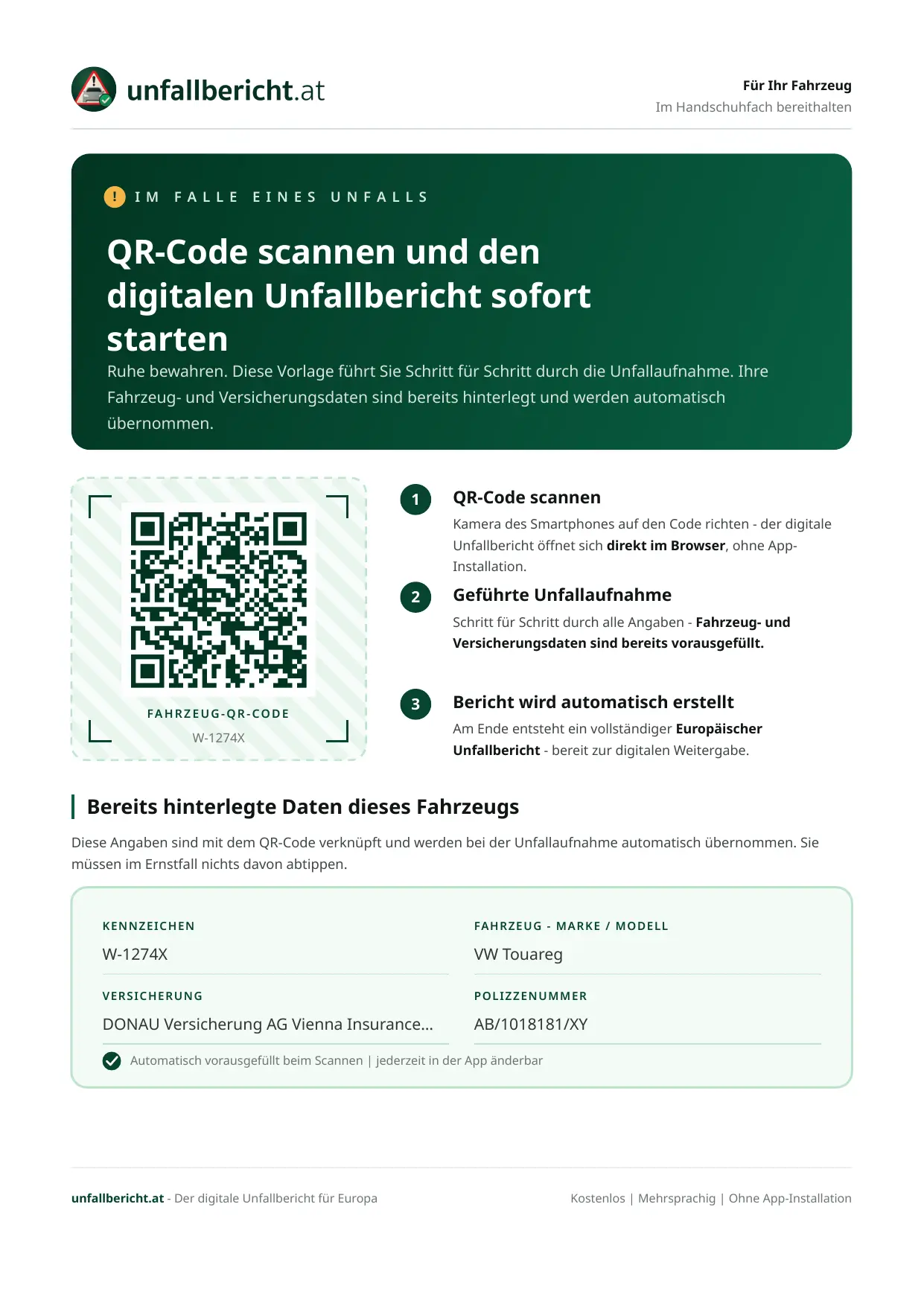
  • Individual QR code per vehicle — leads straight into the guided accident capture
  • Clear 3-step guide, understandable even in an exceptional situation
  • Stored vehicle and insurance data at a glance
A4 · print template
unfallbericht.at
Accident? Scan the QR code
  1. 1Scan the code with your smartphone
  2. 2Add course of events & photos
  3. 3Complete the report — done
W-12345A · VW Golf VIII

Your fleet dashboard

Vehicles, QR codes and claims in one place

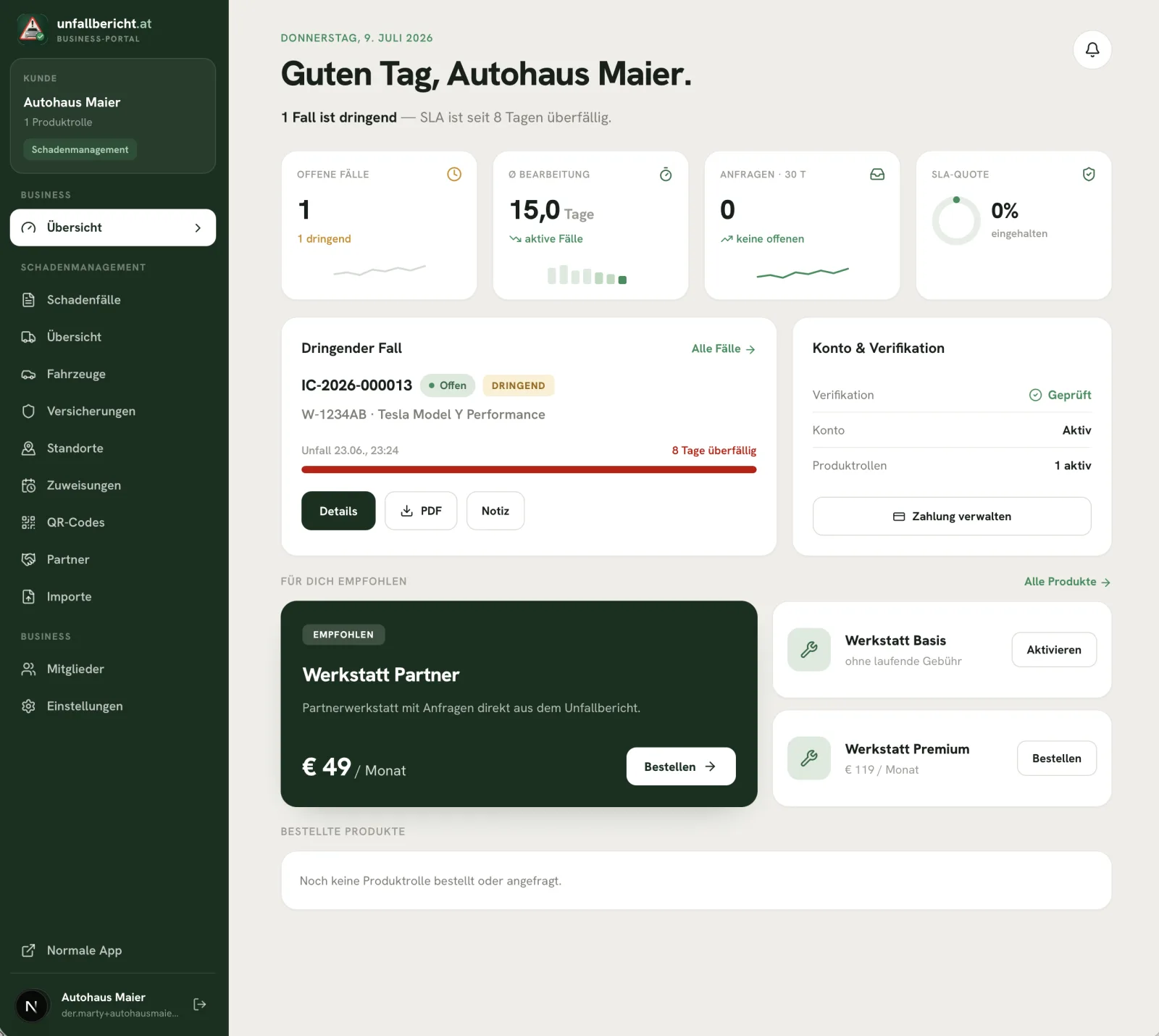
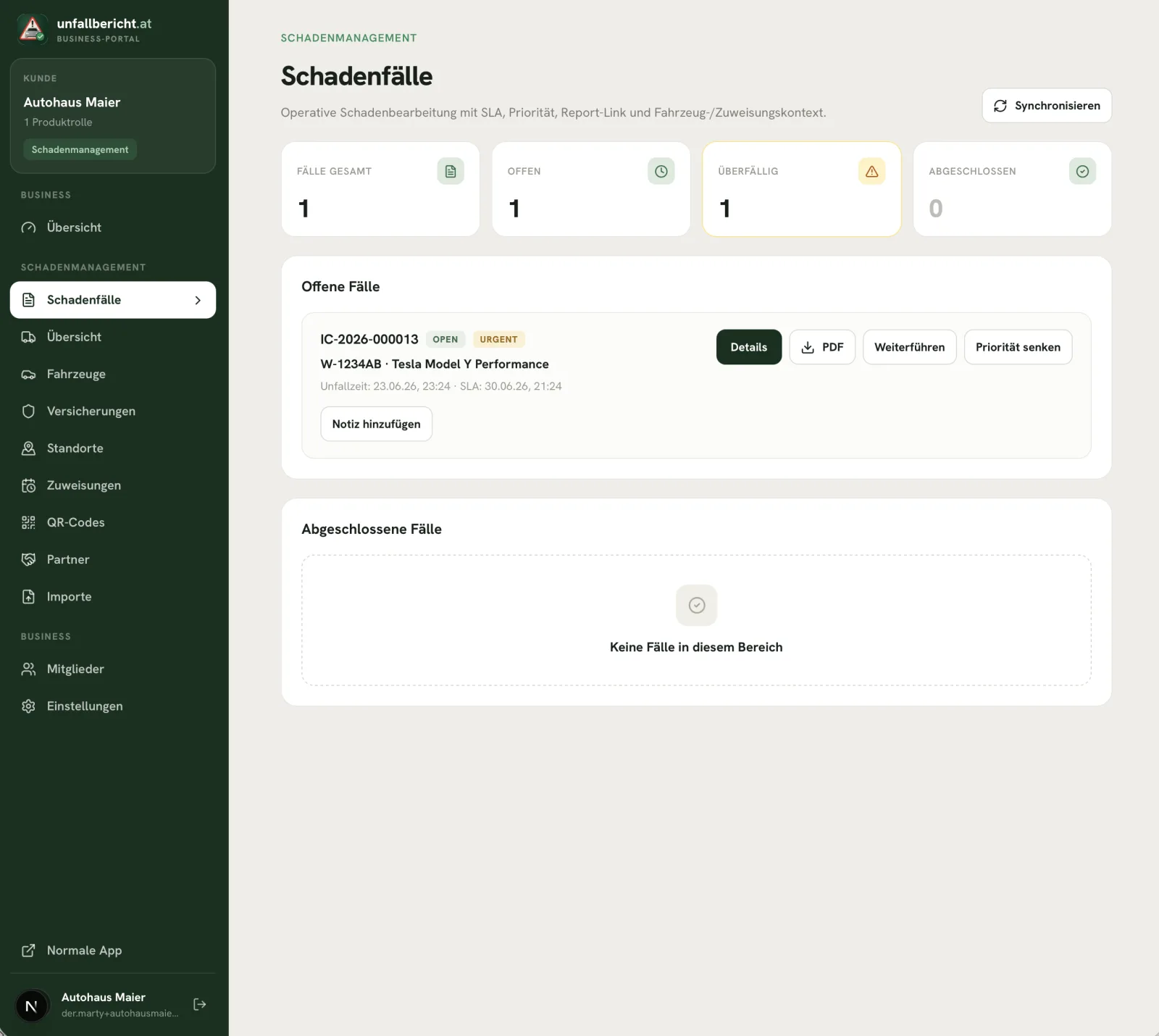
With the business access you manage vehicles and QR codes, see incoming accident reports and export finished case documents as PDF — right in the browser, without installation.
Business portal — overview
Overview · Open cases, processing times and urgent claims at a glance
Business portal — claims
Claims · Incoming reports with status and priority
Business portal — case detail
Case detail · Accident report, vehicle data and PDF export per case

Value

A win for the fleet and its drivers

For the fleet

Full overview without chasing

  • Every accident report lands with you automatically and completely
  • Clear assignment to the vehicle via the QR code
  • Consistent report quality through guided capture
  • Faster handling with insurer and repair shop
For drivers

Reassurance in an exceptional situation

  • Scan the QR instead of searching for forms — even in an unfamiliar vehicle
  • Step-by-step guidance through the accident capture
  • No need to memorise company data — everything is prefilled
  • Right in the browser, without installation and without login

Frequently asked questions

Answers to the most important questions about the fleet solution.

Does Unfallbericht.at replace our fleet management software?

No — by design. The solution specifically covers the claim: from QR-based accident capture to the finished document in your dashboard. It complements your existing systems instead of replacing them.

Do our drivers have to install anything?

No. The QR code opens the accident capture directly in the smartphone browser — no app installation, no login and no prior knowledge.

What is already prefilled in the report?

Everything that belongs to the vehicle: plate, make and model, insurance data and your company data. The driver only adds course of events, parties and photos.

How do the QR codes get into the vehicles?

When you add a vehicle, the app automatically creates the matching QR code as a print template. Print it, put it in the glovebox — that is all.

What happens after a report comes in?

The case appears in your dashboard and can be reviewed, given a status, exported as PDF and forwarded to insurer or repair shop.

Ready to manage your fleet’s accidents without chasing?

We are happy to show you in a short demo how vehicles, QR codes and incoming reports work together.